EasyTalk Editor Settings
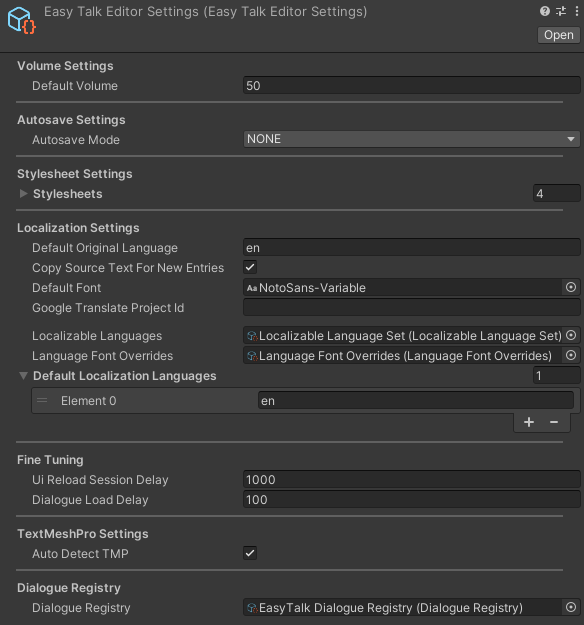
The EasyTalk Editor Settings asset stores settings used by the Node Editor and other editor-only features of EasyTalk.
Volume Settings
Default Volume
The default volume to use in the node editor when previewing audio on conversation nodes.
Autosave Settings
Autosave Mode
- NONE - Disables auto-saving in the node editor.
- TIMED - Automatically saves Dialogues in the node editor every certain number of milliseconds.
- ON_CHANGES - Automatically saves the Dialogue in the node editor whenever a change is made (this is not recommended as it can cause significant lag).
Stylesheet Settings
Defines the stylesheets to be loaded for the node editor UI.
Localization Settings
Default Original Language
The ISO-639 language code for the original language the game's dialogue is written in.
Copy Source Text For New Entries
When this is toggled on or set to true, entries added to translation libraries for alternative languages will be populated with a copy of the original language text, rather than being left blank.
Default Font
The default font to use for UI components in the node editor.
Google Translate Project ID
The Google Translate Project ID to use when using Google cloud translation services for automatic translation.
Localizable Languages
The Localizable Language asset to use. Defines available/supported languages which are made available for selection in the node editor.
Language Font Overrides
The Language Font Overrides asset to use. This asset specifies which font to use in the node editor UI when the language is switched.
Default Localization Languages
Defines which languages should be translated to whenever using automatic Google cloud translation, or when creating localization files.
Fine Tuning
UI Reload Session Delay
A delay for reloading the node editor UI after a Unity session reload. Adjusting this can result in faster load times, but setting the value too low can cause unexpected bugs and timing issues.
Dialogue Load Delay
A delay for loading dialogue into the node editor, after the UI has loaded. Setting this value too low can cause timing issues and inconsistencies.
TextMeshPro Settings
Auto Detect TMP
When set to true, the system will attempt to automatically detect a TextMesh Pro installation, and adjust the EasyTalk installation accordingly.
Dialogue Registry
The Dialogue Registry to use in the node editor. The registry defines global variables and has a reference to the primary character library.